













简体中文| English| Project Homepage | Documentation
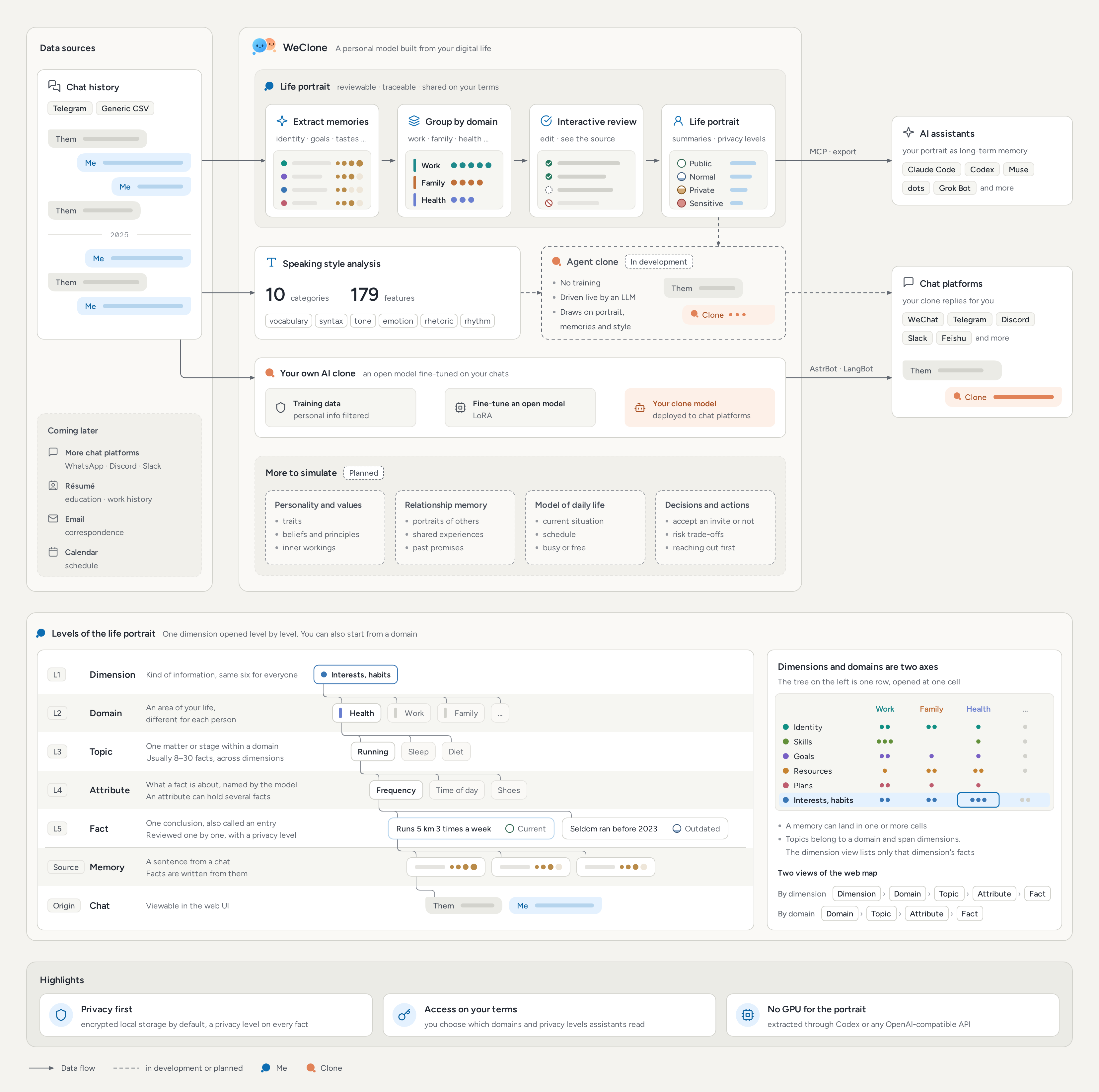
WeClone distills your identity, goals, preferences and current situation from your digital life into a life portrait, organized into domains such as work, family and health, that you can review, trace and share on your own terms. The portrait serves as long-term memory for your personal assistants and will power clones with your personal style.
- 🗺️ Interactive life portrait: your portrait is organized by domain and topic. Every fact traces back to its source and can be reviewed and edited. Extraction runs through Codex or any OpenAI-compatible API.
- 🎭 Your own AI clone: fine-tune an open model on your chat history and deploy it to Telegram, Discord, Slack, Feishu and more through AstrBot or LangBot. Training data is filtered for personal information.
- 🧠 Connect personal assistants: Claude Code, Codex, dots, Muse, Grok Bot and other personal assistants use your portrait through MCP or their memory. You choose which domains and privacy levels they get.
- 🗣️ Speaking style analysis: 179 style features in ten categories, covering vocabulary, syntax, tone, emotion, rhetoric and conversational rhythm.
- 🤖 Agent clone (in development): no training required. A large model drives the clone in real time from your portrait, memories and speaking style.
- 🔒 Privacy first: encrypted local storage by default, a privacy level on every fact, and full control over what is exported and shared.
Note
WeClone now goes beyond fine-tuned clones. The original fine-tuning workflow remains fully supported, see Fine-tuned clone.
The portrait and its extraction prompts are currently in Chinese, and English chats have not been tested yet. The web UI is available in English and Chinese.
- [26/11/03] Life portrait:
build-profileextracts, organizes and summarizes your portrait in one command, ready for fact-by-fact review in the web UI - [26/11/03] Assistant access: Claude Code, Codex and other personal assistants read your portrait over MCP
- [26/11/03] Encrypted storage by default, and token access for chat bots
- [25/07/10] Telegram added as a data source
- [25/06/05] Fine-tuning on image data
The life portrait reads text messages only. The table shows the message types the fine-tuned clone supports. See Preparing data for exporting and setup.
| Platform | Text | Images | Voice | Video | Animated Emojis/Stickers | Links (Sharing) | Quote | Forward | Location | Files |
|---|---|---|---|---|---|---|---|---|---|---|
| Telegram | ✅ | ✅ | ❌ | ❌ | ❌ | ❌ | ✅ | ✅ | ❌ | |
| 🚧 | 🚧 | 🚧 | 🚧 | 🚧 | 🚧 | 🚧 | 🚧 | 🚧 | 🚧 | |
| Discord | 🚧 | 🚧 | 🚧 | 🚧 | 🚧 | 🚧 | 🚧 | 🚧 | 🚧 | 🚧 |
| Slack | 🚧 | 🚧 | 🚧 | 🚧 | 🚧 | 🚧 | 🚧 | 🚧 | 🚧 | 🚧 |
Chats from other platforms can be converted to WeClone's generic CSV format and placed in dataset/csv/. See Preparing Data on the docs site for the format.
Python 3.12 is required. uv is recommended:
git clone https://github.com/xming521/WeClone.git && cd WeClone
uv venv .venv --python=3.12
source .venv/bin/activate   # Windows: .venv\Scripts\activate
uv pip install -e .
cp settings.template.jsonc settings.jsonc
All settings live in settings.jsonc. The base install is enough to build your portrait and connect personal assistants. By default the portrait is extracted through the Codex CLI, which must be installed and signed in. Any OpenAI-compatible API works as well, see Installation and configuration.
Telegram chats are supported today. Export them as JSON with Telegram Desktop, put the ChatExport_* folders in dataset/telegram/, then set platform to telegram and telegram_args.my_id to your user ID in settings.jsonc. Chats from other platforms can be converted to the generic CSV format and placed in dataset/csv/. See Preparing data.
weclone-cli serverOpen http://127.0.0.1:5175, set a password, and build your portrait on the Build portrait page, which checks the setup and shows the progress. Then review your portrait fact by fact, approve the summaries on the Portrait summary page, then generate a token on the Assistants page and run the commands it shows for Claude Code or Codex. You can also copy the export text on the Portrait summary page into an assistant's memory. See Life portrait and assistants.
An NVIDIA GPU is required. The default Qwen2.5-7B-Instruct with LoRA needs about 16GB of VRAM. Install the dependencies and download the model as described in Fine-tuned clone, then run:
weclone-cli make-dataset                     # build training data, filtering personal information
weclone-cli train-sft                        # LoRA fine-tuning
weclone-cli server --inference --port 8005   # OpenAI-compatible API
Connect the trained clone to chat platforms through AstrBot or LangBot, see Chat bots.
- Model services during extraction: while building your portrait, chat content is sent to the model service you configured, after you confirm. Content already extracted is read from a local cache and not sent again.
- Encrypted by default: the chat snapshot, portrait, training data and fine-tuned model are stored encrypted on your machine, with one password shared by the web UI and the command line.
- Access on your terms: every fact carries a privacy level (public, normal, private, sensitive), and you set in the web UI which domains assistants can read and up to which level.
- Training data filtering: Microsoft Presidio and your own blocked words remove personal information before fine-tuning, though 100% detection is not guaranteed.
See Security.
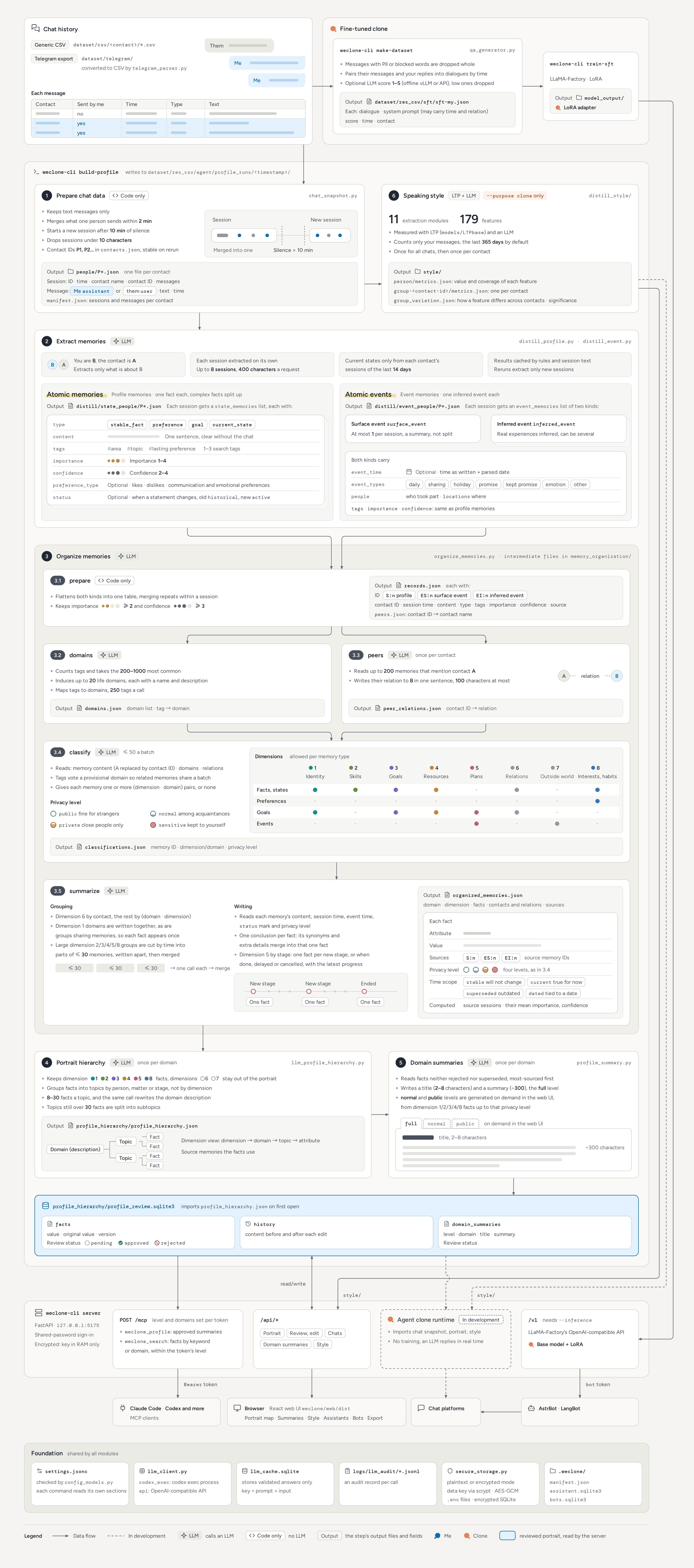
Show the architecture diagram: the modules, the data flow and the files each step writes. Click it for the full-size image.
| Document | Covers |
|---|---|
| Installation and configuration | What to install, model backend, speaking style and fine-tuning dependencies |
| Preparing data | Supported sources, Telegram export, generic CSV format |
| Life portrait and assistants | build-profile, web review, portrait summary, MCP |
| Fine-tuned clone | Hardware, model download, training data, training and inference |
| Chat bots | Bot token, AstrBot, LangBot |
| Security | Storage modes, password, keys and tokens, request logs |
Full tutorials, configuration reference and FAQ are on the documentation site.
- Life portrait: extraction, review and portrait summary
- Long-term memory for personal assistants, over MCP or the portrait summary
- Agent clone driven by your portrait, memories and speaking style
- Support more data sources
- Richer context: including contextual conversations, chat participant information, time, etc.
- Multimodal support: image support already implemented
- Data augmentation
- Start with the official FAQ. DeepWiki can also help.
- Join the Telegram group linked at the top of this page.
Issues and pull requests are welcome, and so is help reviewing PRs. Please discuss new features in an issue first. See the contributing guide for the development environment, tests and frontend builds.
Thanks to BUPT VCIS Lab for its support, and to the following code contributors and other community members for their contributions.
This project also benefits from excellent open source projects such as LLaMA-Factory, AstrBot, LangBot, and others.
Important
This project is intended for learning and research. Assess the risks yourself before using it in production or offering it as a service.
Click to view the disclaimer terms
- Provided as is: the project comes without warranties of any kind. The authors are not liable for any direct or indirect loss arising from its use and do not commit to ongoing maintenance or support.
- Data and consent: chat history contains other people's messages. Make sure that collecting and using the data complies with local laws and that the people involved have consented.
- Portrait extraction by LLMs: while your portrait is built, chat content, including the other side's messages, is sent to the model service you configured and handled under that service's data policy. Choose a provider you trust and check its data retention and training terms. Leave chats you don't want sent out of the data directory.
- Portrait content: the portrait collects and infers personal information about you, touches on the people around you, and may include sensitive topics such as health or relationships. Keep result directories and exported files safe, and review the portrait before giving assistants access.
- Model output: portraits, summaries and clone replies are generated by models. They may be inaccurate and do not represent the real views of you or anyone else.
- AI disclosure: when a clone talks to other people, make clear that it is an AI so that no one mistakes it for a real person.
- Lawful use: do not use this project for any unlawful purpose.
This disclaimer may be revised as the project evolves.
Tip
If this project is helpful to you, or if you are interested in the future development of this project, please give the project a Star, thank you