An MCP server is a small program your agent can start to give it a new ability — reading a database, calling an API. Installing one copies the files and adds an entry to your agent’s config. It runs only when your agent starts it. More about MCP servers.
Not available through Techandria. Techandria only installs commits a person has approved. This one has not been.
You can still get the code from the source and read it yourself:
git clone https://github.com/microsoft/skills
What we checked
Not yet reviewed
Discovery metadata only. Nothing has been scanned or approved, so this is a listing — not a recommendation to run the code.
Nothing has been scanned for this repository yet, so there is nothing to report. Listing here is not permission or a recommendation to run the code.
Maintain this project? Add the review badge to your README
The badge shows this project's current review state and updates on its own — including if the state changes. It links back to this page.
Multi-modal Generative Media Skills for AI Agents (Claude Code, Cursor, Gemini CLI). High-quality image, video, and audio generation powered by muapi.ai.
Work in Progress — This repository is under active development. More skills are being added, existing skills are being updated to use the latest SDK patterns, and tests are being expanded to ensure quality. Contributions welcome!
Skills, custom agents, AGENTS.md templates, and MCP configurations for AI coding agents working with Azure SDKs and Microsoft AI Foundry.
Select the skills you need from the wizard. Skills are installed to your chosen agent's directory (e.g., .github/skills/ for GitHub Copilot) and symlinked if you use multiple agents.
Alternative installation methods
Manual installation (git clone)
# Clone and copy specific skills
git clone https://github.com/microsoft/skills.git
cp -r agent-skills/.github/skills/azure-cosmos-db-py your-project/.github/skills/

# Or use symlinks for multi-project setups
ln -s /path/to/agent-skills/.github/skills/mcp-builder /path/to/your-project/.github/skills/mcp-builder

# Share skills across different agent configs in the same repo
ln -s ../.github/skills .opencode/skills
ln -s ../.github/skills .claude/skills
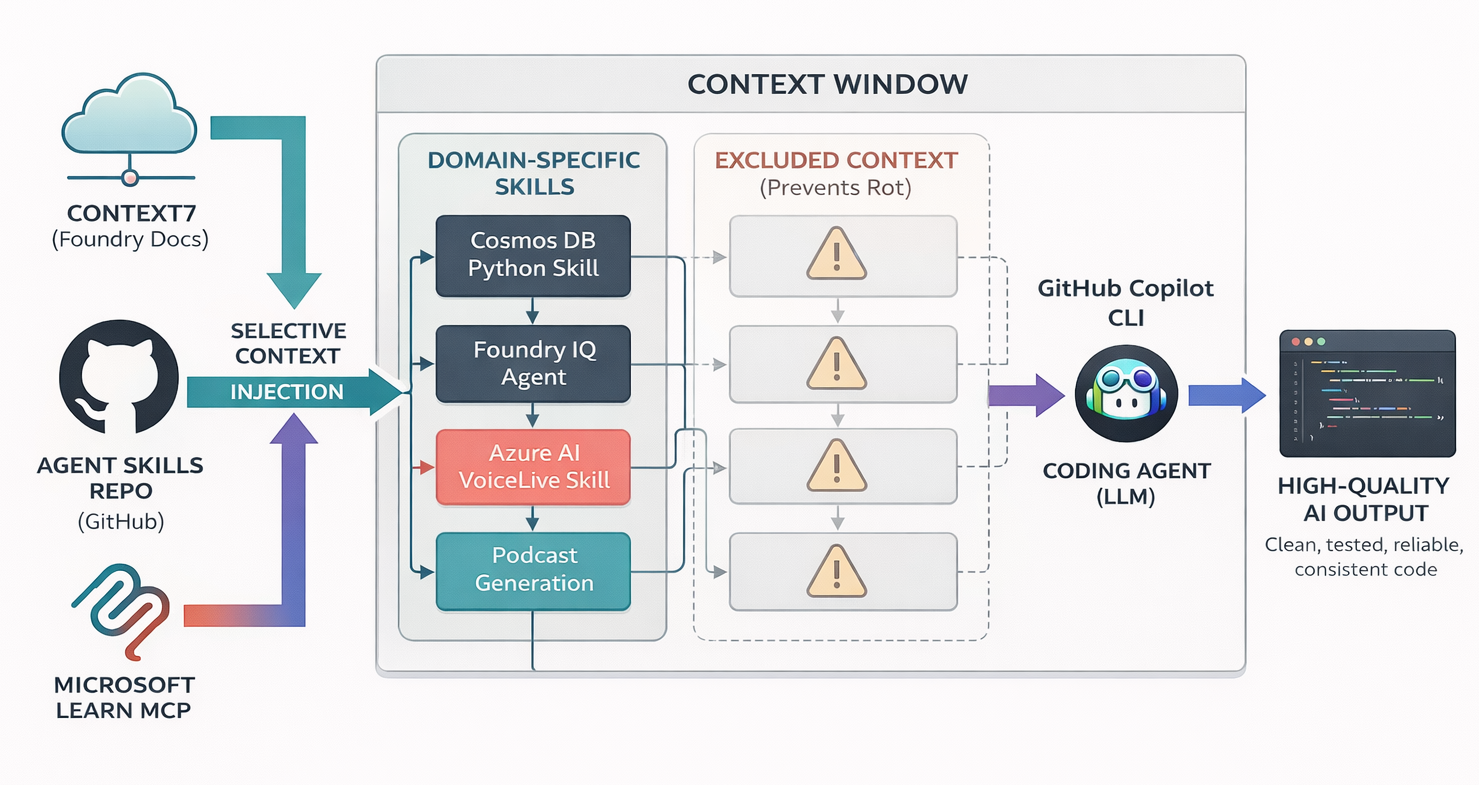
Coding agents like Copilot CLI and GitHub Copilot in VS Code are powerful, but they lack domain knowledge about your SDKs. The patterns are already in their weights from pretraining. All you need is the right activation context to surface them.
Important
Use skills selectively. Loading all skills causes context rot: diluted attention, wasted tokens, conflated patterns. Only copy skills essential for your current project.
Microsoft Entra Agent ID (preview) — create OAuth2-capable AI agent identities via Microsoft Graph beta API. Blueprints, BlueprintPrincipals, permissions, WIF.
Router skill for the Foundry agent platform — maps user intent onto the right sub-skill and discovery surface (Microsoft Docs MCP, Foundry MCP, azd ai agent, az CLI).
Provision Foundry resources/projects, configure project connections (key, OAuth, managed identity, agent identity), and set up standard or private-network agent infrastructure.
Curate intent-based Foundry Toolboxes (preview) — a single MCP-compatible endpoint bundling tools (MCP, Web Search, AI Search, Code Interpreter, File Search, OpenAPI, A2A) for any agent to consume.
Manage SKILL.md files as a Foundry-side resource (preview) — author behavioral guidelines once, store via the Skills REST API, load into hosted agent containers.
Govern Foundry agent fleets at scale — tool catalog visibility, AI Gateway MCP routing/policy, RBAC, agent identity, RAI policies on model deployments.