






LifeOS-8.761.0-release.mp4
LifeOS is a General Purpose AI Harness for doing anything you want to do in life and work with AI. It captures who you are, what you care about, and where you're trying to go, then uses AI that knows you to help you get there.
And because it has your full context, it makes everything you do more efficient and effective, from building apps, to starting a business, to creative projects…basically anything.
Note
The whole system works on one central concept: moving from your Current State to your Ideal State — in pursuit of Euphoric Surprise.
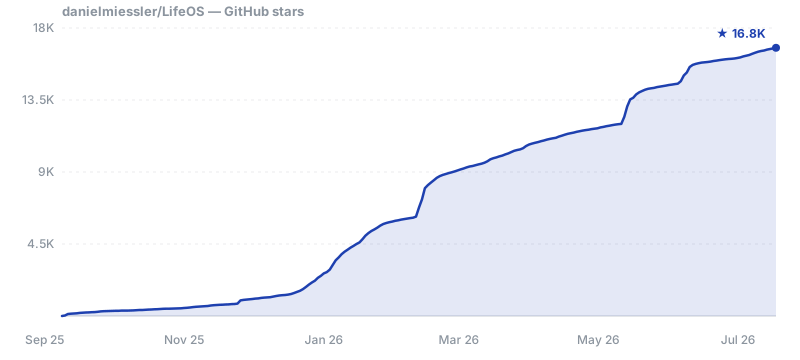
Stars help more people find the project and keep it moving. It takes one click.

LifeOS is fundamentally one person's personal AI harness, published as-is, and it is constantly in flux: security features are added, enhanced, removed, modified and adjusted from release to release. The security of any LifeOS component, and of the system as a whole, is not guaranteed. Responsibility for the security of your system is yours, not the LifeOS authors' or contributors'.
Before anything is installed, the installer asks: "Do you understand that you are responsible for the security of your own system and that we are not responsible?" It goes ahead only if you answer yes. See SECURITY.md.
Give it to your AI. LifeOS is installed by an AI, so the install is just a prompt. Paste this into your AI coding harness — Claude Code, Cursor, Codex, Hermes, or any capable agent — and it does the whole setup for you:
Read https://ourlifeos.ai/install and install LifeOS for me.
Your AI reads the install page and walks the setup, asking permission before it touches anything.
Prefer the terminal? There's a one-line shortcut for Claude Code on macOS/Linux:
curl -fsSL https://ourlifeos.ai/install.sh | bashEither path needs a capable AI coding harness — we build and run on Claude Code — and bun.
The unique features — the parts you won't find anywhere else. Anything a good harness already provides on its own (built-in subagents, for example) isn't listed; this is only what LifeOS adds. See them live and click through on ourlifeos.ai.

LifeOS ships 97 public skills, from research, security, writing and art to video, publishing and your home. Browse them all on the site.
Your harness gives you raw capability. LifeOS is the layer on top that makes it yours — a system that knows your goals, people, and context, and keeps working toward them:
- Persistent memory — Your DA remembers past sessions, decisions, and learnings
- Custom skills — Specialized capabilities for the things you do most
- Your context — Goals, contacts, preferences—all available without re-explaining
- Intelligent routing — Say "research this" and the right workflow triggers automatically
- Self-improvement — The system modifies itself based on what it learns
Your harness is the engine. LifeOS is everything else that makes it your car.
Any high-end one. LifeOS is harness-agnostic by design — it's built on universal primitives (hooks, skills, context files, agentic routing), not one vendor's features. The code is TypeScript and Bash, and the core ideas — TELOS, the Algorithm, skills, memory — port to any capable agent.
Daniel builds and runs it on Claude Code, so that's the most-tested path today. But LifeOS isn't locked to it, and it's designed to run wherever your AI does.
Fabric is a collection of AI prompts (patterns) for specific tasks. It's focused on what to ask AI.
LifeOS is infrastructure for how your DA operates—memory, skills, routing, context, self-improvement. They're complementary. Many LifeOS users integrate Fabric patterns into their skills.
Recovery is straightforward:
- Back up first — Before any upgrade:
cp -r ~/.claude ~/.claude-backup-$(date +%Y%m%d) - USER/ is safe — Your customizations in
USER/are never touched by the installer or upgrades - Settings merge, not overwrite — The installer only updates identity and version fields; your hooks, statusline, and custom config are preserved
- Git-backed — Version control everything, roll back when needed
- History is preserved — Your DA's memory survives mistakes
- DA can fix it — Your DA helped build it, it can help repair it
- Re-install — Run the installer again; it detects existing installations and merges intelligently
| Feature | Description |
|---|---|
| Local Model Support | Run LifeOS with local models (Ollama, llama.cpp) for privacy and cost control |
| Remote Access | Access your LifeOS from anywhere—mobile, web, other devices |
| Outbound Phone Calling | Voice capabilities for outbound calls |
| External Notifications | Robust notification system for Email, Discord, iMessage, Slack |
GitHub Discussions: Join the conversation
Community Discord: LifeOS is discussed in the community Discord along with other AI projects
Twitter/X: @danielmiessler
Blog: danielmiessler.com
We welcome contributions! See our GitHub Issues for open tasks.
- Fork the repository
- Make your changes — Bug fixes, new skills, documentation improvements
- Test thoroughly — Install in a fresh system to verify
- Submit a PR with examples and testing evidence
MIT License - see LICENSE for details.
Anthropic and the Claude Code team — First and foremost. You are moving AI further and faster than anyone right now. Claude Code is the foundation that makes all of this possible.
IndyDevDan — For great videos on meta-prompting and custom agents that have inspired parts of LifeOS.
LifeOS is built in the open, and the community's pull requests, forensic bug reports, and fresh-install writeups directly shape every release. The public repo is generated from a private source tree, so community PRs are ported into source with credit rather than merged directly — same fix, durable across releases.


The 28 highest-commit contributors — see all on the contributors graph. Avatars are committers only, so the lists below carry everyone the graph can't see.
fayerman-source — Google Cloud TTS provider integration and Linux audio support for the voice system.
Matt Espinoza — Extensive testing, ideas, and feedback, plus roadmap contributions.
Code contributions (merged or ported PRs): adamlevoy · alloutflo · anikinsasha · asdf8675309 · atabisz · chrisglick · christauff · Chuckos · erf1nd0r · HotSauceHacker · imrathion · J0UH · jbmml · jnpkr · justinkatz94-glitch · ksylvan · m4nt0de4 · m8ryx · MarvinDontPanic · maxolasersquad · Mutdogus · neilinger · neilsoult · pybe · qozle · rathko · rpriven · runnerr0 · salmanmkc · sauldataman · Seadubb · Spirotot · StarksLabs · thatsjet · tzioup
Bug reports, fresh-install forensics, and design feedback: badosanjos · benoitdepaire · bnkath2o · brycemagera · catchingknives · DAESA24 · deleyva · DRAZY · DennisTraub · docxology · DolphusCY · donovan-sec · DonovanJonesUK · eccentricnode · fjp-veo · harryf · hjbrandt · HyggeHacker · ichoosetoaccept · infinitelyloopy-bt · jacobo-ortiz · JElliottMiller · jdrolls · jlacour-git · jmmarkiewicz · karlwaldman · klausagnoletti · lexilexikon · lgangitano · loudoguno · luccomo · MatiasBarboza · MHoroszowski · michaelaye · mygirleatsmayo · nbost130 · NodarDavituri · NorthwoodsSentinel · packetsherpa · Piroshki · ricklesgibson · rikitikitavi2012-debug · Riskjuggler · sbusc · simeonzickert · Steffen025 · stratofax · tzioup · vanvonlj · vichong · virtualian · vpzed · waveman2020-sudo · wojteksbt · xmasyx
Refreshed wi